

Tilda: what the builder does, what it costs in USD and where it hits limits
We need a landing page for an ad campaign by Monday, there is no developer on the team, and the budget for an agency is not there. That is when people reach for Tilda, a builder where you assemble a page from ready-made blocks in the browser. We look at what it does, what it costs, how it handles Google search, and which limits show up later.

What is Tilda?
Tilda is a cloud website builder. The editor, the servers and publishing all live inside the platform, so there is no CMS to install, no hosting plan to rent and no page template to code by hand. You assemble a page from ready-made blocks such as menus, covers, galleries, reviews and forms, and each block has a "Settings" panel for spacing and background and a "Content" panel for text and images.
The standard blocks already adapt to desktop, tablet and phone, which is a real difference from many no-code builders where responsiveness is left to the author. When the library does not have what you need, you open Zero Block, a free-form editor with layers and animation. It gives exact control and asks for more manual work.
It started as an internal tool. Designer Nikita Obukhov founded Tilda in 2014, according to Tilda's own FAQ. When TechCrunch reviewed it in 2016, the company reported about 4,000 repeat customers, no outside funding and a $15 per month price for a standard landing page. The reviewer built a working page in roughly 15 minutes.
The reviewer named Zero Block as the main differentiator: an editor inside the editor where you control typography, draw shapes and build animations.
Users build a website from pre-designed blocks. It's not templates, so it's quite flexible.
Nikita Obukhov, Tilda founder, to TechCrunch (2016)
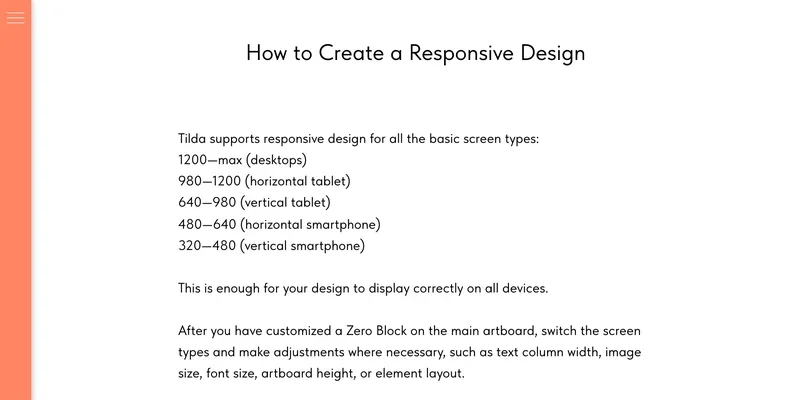
That freedom has a cost. In Tilda's Zero Block guide, the designer builds the layout on the main artboard, then switches through the other screen types (from 1200 px and up down to 320-480 px) and fixes text column width, image size, font size and artboard height where needed. If the site changes every week, such as an event page, every edit in a Zero Block has to be repeated for each screen range.
Which sites suit Tilda, and where it struggles
Our rule of thumb: if the job can be described with the verbs "show, persuade, collect a request, take a payment, publish content", a builder usually fits. Complex user roles, custom calculations and server-side logic need a careful check first. A local business site, a service page or a campaign landing page are the typical fits.
Hypothetical example, for illustration only: a Denver HVAC company needs a landing page for a Google Ads campaign by Monday and has no developer. A single-goal page (offer, proof, form, phone number) built from standard blocks is a realistic fit.
The conversion rate depends on page structure more than on blocks. A case from the MuscleLend studio, published on Habr, is a foreign one: the traffic came from Russian ads, so treat the numbers as a direction, not a benchmark. The studio tested three landing pages for a fitness trainer with the same ad parameters over one week of campaigns. Version one, with generic headings such as "About me", converted at 3.45%. Version two replaced them with benefits, numbers and proof and reached 20.73%. Version three added a deadline for the free offer, a second form after the testimonials and a new block order, and reached 21.35%. A one-week test is small, so read the gap as a direction.
Content projects and simple stores fit too. Think twice about Tilda when you need:
- inventory sync between the storefront and a warehouse or ERP system;
- several shipping methods with carrier-based rates and state-by-state sales tax rules;
- customer accounts with custom logic or your own database.
For catalog size, check the feature table on the pricing page, and read our guide on ecommerce SEO before moving a large store to any builder.
How much does Tilda cost?
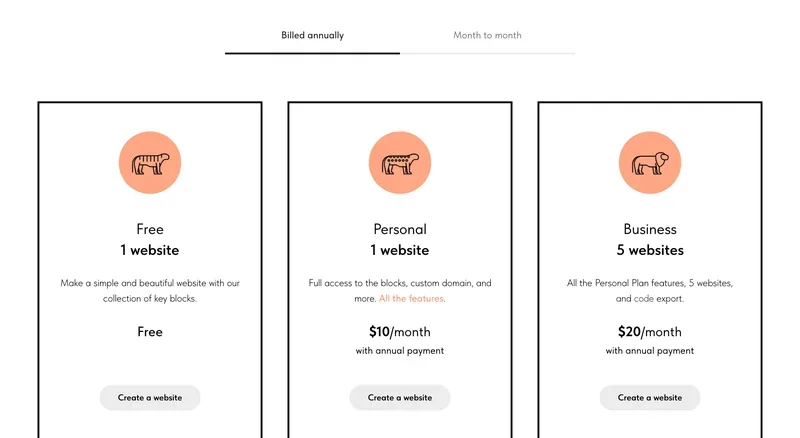
The pricing page lists three plans in US dollars. Free covers one website and a collection of key blocks. Personal covers one website, the full block collection and a custom domain: $10 per month billed annually, or $15 month to month. Business covers five websites and adds code export: $20 per month billed annually, or $25 month to month.
| Plan | Websites | What matters | Per month, billed yearly | Per month, month to month |
|---|---|---|---|---|
| Free | 1 | Key blocks, no custom domain | $0 | $0 |
| Personal | 1 | Full block collection, custom domain | $10 | $15 |
| Business | 5 | Everything in Personal, plus code export | $20 | $25 |
Plan limits matter for SEO. Tilda's notes on switching to the Free plan list what stops working there: custom domain, form data capture, payment systems and the catalog. Google Analytics, the webmaster panel and head tag editing are off too, and the page cap is 50. A Free site is for learning the editor.
The "Made on Tilda" label comes off only on a yearly Personal or Business plan. In Tilda's instructions, you open Site Settings, then More, set Platform Label to Off, save, and republish all pages. Month-to-month plans do not include it.
Besides the subscription you need a domain. Buy it from a registrar such as GoDaddy or Namecheap, then point it at Tilda. Prices change, so check the live pricing page.
What you can connect to Tilda
Form leads do not have to end up in an inbox. Tilda can send them to services such as Google Sheets, and its help center also describes email, Telegram and webhook receivers, so a webhook can feed your CRM.
For payments, Tilda says it integrates with Stripe, PayPal and 2Checkout, and offers a custom payment gateway option for developers.
Forms and email need a US legal check, not a technical one. If a form feeds a mailing list, the FTC's CAN-SPAM guide requires accurate headers and subject lines, a physical mailing address, a clear opt-out, and opt-outs honored within 10 business days, with penalties of up to $53,088 per email. The California attorney general's CCPA page says the law covers for-profit businesses above $25 million in revenue, or those handling data of 100,000 or more California residents or households, or earning half their revenue from selling personal information. Where it applies, you need a notice at collection and a privacy policy. Tilda's form builder can add a required checkbox that links to your policy.
One detail from Tilda's technical information page: form data is cached on European servers for a short time before it goes to your connected service, one month by default, adjustable to one day or immediate deletion. Reflect that in your privacy policy.
Google Analytics connects in the site settings (not on the Free plan). After any site-wide change, republish all pages so it reaches the live ones.
Your first page, step by step
You do not need the whole interface for a first project. Follow this short path:
- Write down one goal for the page: a lead, a sale or an event signup.
- Create a project from a template or a blank page and build the skeleton: cover, offer, benefits, proof, answers to objections, call to action.
- Add a form, with a checkbox that links to your privacy policy if you collect personal data.
- Check the mobile view. Zero Block elements need hand-tuning for each screen range.
- Fill in the title, description and URL of the page, connect your domain, and connect Google Search Console.
- Press "Publish"; until then visitors see the old version.
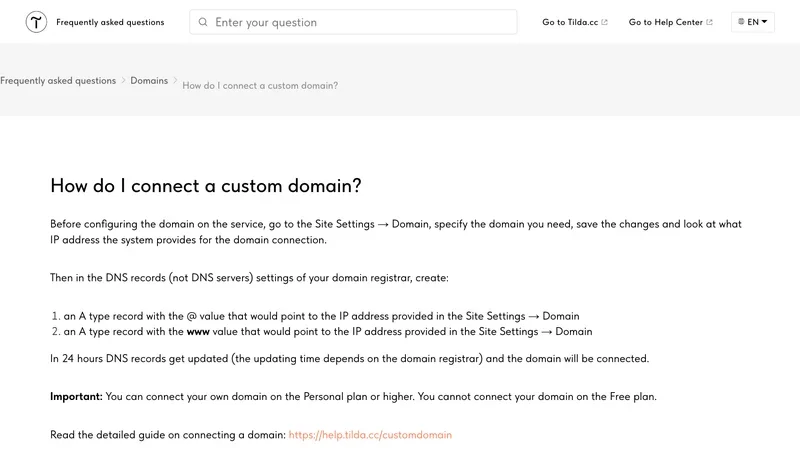
To connect a domain, Tilda's FAQ says you set it in Site Settings, then create two A records at your registrar, one for "@" and one for "www", pointing to the IP address Tilda shows you. DNS updates take up to 24 hours, depending on the registrar. A custom domain needs the Personal plan or higher. Register it in your own name, not in a contractor's account.
HTTPS is configured in the site settings too. Tilda's redirect instructions say the HTTP-to-HTTPS redirect (Site settings, SEO, WWW and HTTPS redirects) can be set only after the SSL certificate is connected for a custom domain, and that you should save and republish all pages afterward.
Structure decides more than blocks do: a fast editor just builds a weak page faster. Read our notes on getting a new site indexed before you send traffic.
SEO on Tilda: what works out of the box and what gets in the way
The basics sit in one place. According to Tilda's SEO guide, robots.txt and sitemap.xml are generated automatically, titles and descriptions are set per page, 301 redirects are configured in the site settings, and an SEO Assistant checks pages for common indexing problems. Connect Google Search Console under Site Settings, SEO, Google Search Console, Manage, Connect. Google's help page explains how to add a property: a Domain property covers all subdomains and protocols and is verified through DNS, while a URL-prefix property covers one exact prefix and allows more verification methods.
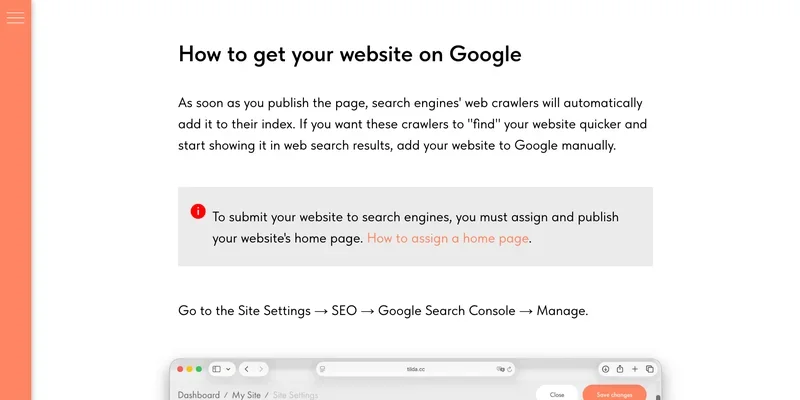
Two points are worth knowing. First, canonical handling is built in: the SEO guide says that once your own domain is connected and pages are published, the domain becomes the canonical URL and the tilda.ws service address is ignored. Google's documentation on consolidating duplicate URLs calls redirects and rel="canonical" strong signals and says Google prefers HTTPS when signals do not conflict, so redirect HTTP to HTTPS and pick one of www or non-www.
Second, files are more flexible than older advice claims. Older FAQ entries say robots.txt cannot be edited, but the current SEO guide describes a manual mode under Site Settings, SEO, Edit robots.txt, with a 60 KB limit, and notes that once you switch to manual, later page-level indexing changes are no longer written into the file automatically. The sitemap has three modes (automatic, automatic with additions, manual), and the file may hold up to 3 MB or 3,000 entries.
Speed, hosting location and US visitors
Tilda says on its technical information page that it does not sell traditional hosting (no FTP, no databases). Its content delivery network has around 100 points of presence and about 5,500 servers worldwide, and the data centers meet TIER III standards. The page does not name data center locations, so you cannot confirm "US hosting" from the vendor. What you can do is measure: Google's Core Web Vitals aim for a Largest Contentful Paint within 2.5 seconds, an Interaction to Next Paint under 200 milliseconds and a Cumulative Layout Shift under 0.1, and the Core Web Vitals report in Search Console shows how real visitors experience your pages.
Tilda's speed checklist is short: keep Lazy Load on, optimize images by hand, use system fonts, disable third-party scripts you do not need, shorten long pages and limit images above the fold. Its FAQ warns that PageSpeed-style tools simulate loading and do not reflect real-device speed, so judge changes with field data. A Business plan site can also be exported to a US host if you need to control the location.
If you also sell in Russia or the CIS, that audience needs its own Yandex setup.
The Zero Block trap
The most common Tilda SEO mistake sits in Zero Blocks. The editor lets you hide an element at a given screen size, and it is easy to leave text outside the visible artboard or to build a separate copy of a block for mobile. Google's spam policies list text hidden from users, such as white text on a white background, text positioned off-screen or a font size of 0, as a violation. They allow accordions, tabs and sliders that serve visitors. Google also indexes the mobile version, and its mobile-first indexing guide says your mobile site should contain the same content as your desktop site, and recommends responsive design.
A practical check for every Zero Block page: open it at each breakpoint, confirm that the visible text and the text in the HTML match, delete leftovers outside the artboard, and avoid copy-pasting a whole block per device. Keep headings and body copy in standard blocks where you can.
Leaving Tilda and exporting code
You can leave, with caveats. Per Tilda's export guide, code export is available on the Business plan only, and the platform gives you static HTML, CSS, JavaScript and images to put on your own server. The terms are strict: you must name the deployment domain in the site settings first, and the rules forbid changing the exported code outside the Tilda platform. Treat it as an escape hatch, not a way to start hand-editing the site.
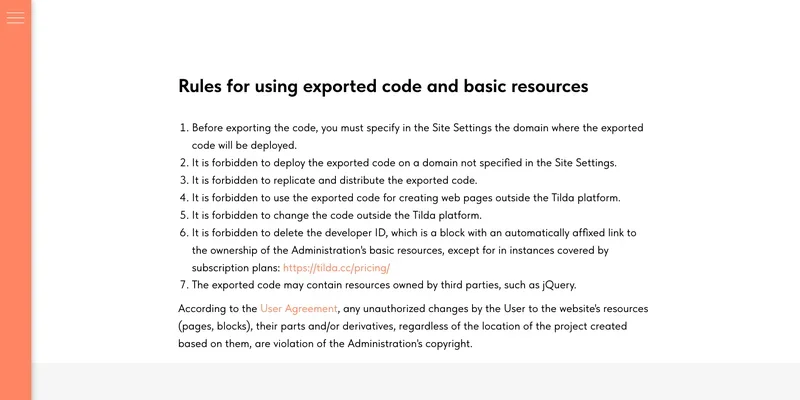
Some features stay behind in the account. The same page lists exceptions: free SSL certificates stop working after export, password protection becomes inactive, and Tilda CRM, Tilda Members, the product catalog and feeds cannot be exported. Form submissions still need an active Tilda subscription.
If the project is likely to need custom logic or a store with its own back end, budget for a move from the start.
Frequently asked questions
Can I build a Tilda website for free?
Yes, on the Free plan: one website and a collection of key blocks. A custom domain needs Personal or higher, so a free site stays on a Tilda address. A live business site with ads belongs on a paid plan: you need your own domain, Google Analytics and the webmaster tools.
How do I remove the "Made on Tilda" label?
Buy a yearly Personal or Business plan, then open Site Settings, More, and switch Platform Label to Off. Save and republish all pages, because the change does not reach already published pages on its own.
Is Tilda good for SEO?
For landing pages, brochure sites and small projects, yes: robots.txt, sitemap.xml, meta tags, canonicals and redirects are covered, and Search Console connects in the settings. The limits show up in competitive niches and large catalogs. Watch for hidden text and duplicate mobile blocks in Zero Block, and check titles, descriptions and URLs before launch.
Where are Tilda's servers located?
Tilda describes a distributed system with servers around the world and a CDN of around 100 points of presence, but does not name data center locations. Check your own pages in Search Console instead of assuming a US location.
Who created Tilda?
Designer and entrepreneur Nikita Obukhov founded it in 2014, according to the company's FAQ.
Дата публикации:
Задать вопрос
Вопросы и ответы
Пока нет опубликованных вопросов. Задайте первый — после модерации он появится здесь.
Вам также может понравиться
Все статьи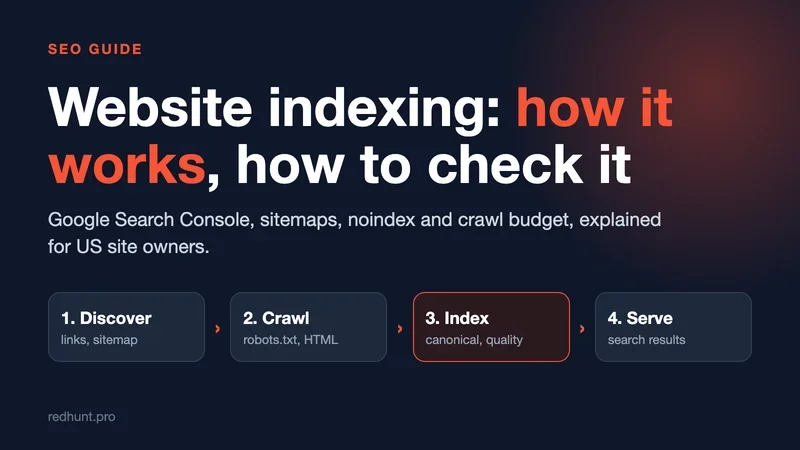
Technical SEO
Website indexing: how it works, how to check it and how to speed it up
How Google indexes a site, how to check pages in Search Console, and how to speed it up with sitemaps, URL Inspection and IndexNow.
Ecommerce
SEO for an Online Store: Catalog Structure, Filters and Product Pages
SEO for a US online store: catalog structure, filter pages, duplicates and crawl, Product markup, Merchant Center free listings and trust signals.
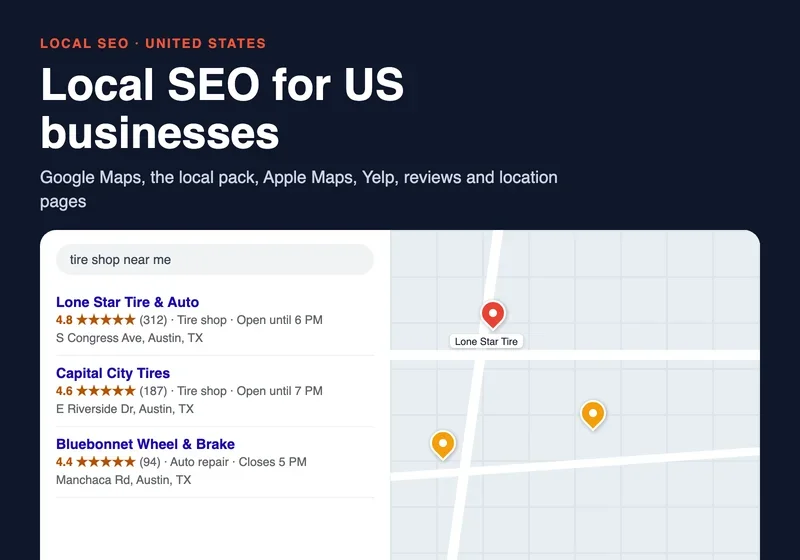
Local business
Local SEO: How to Get Your Local Business Into Google Maps and the Local Pack
US local SEO: Google Business Profile, local pack, Apple Maps, Bing, Yelp, NAP and citations, location pages, reviews rules and a three-month plan.

IT companies
Marketing for IT services companies: how to win projects in the US
How US IT services firms win clients: buying committees, case studies, Clutch and G2, LinkedIn, SOC 2 pages, CAN-SPAM, cloud marketplaces and ABM.