

Local SEO: How to Get Your Local Business Into Google Maps and the Local Pack
Local SEO helps a business get found by people searching for a product or service in their city or neighborhood: in the Google local pack, on Google Maps, Apple Maps, Bing and Yelp, and in regular results. The work rests on five pillars: a verified and complete Google Business Profile, the same name, address and phone number on every platform, separate location or service-area pages, a steady flow of honest reviews, and measuring customer actions.

What is local SEO, and where does the customer see it?
A search like "tire shop near me" or "dentist in Austin 78704" is location-based: the right answer depends on where the person is standing. For these queries Google shows a map with a short list of nearby businesses, usually called the local pack, with star ratings, review counts and hours. The same businesses appear in the Google Maps app, and Apple Maps, Bing Maps and Yelp show their own versions of the list.
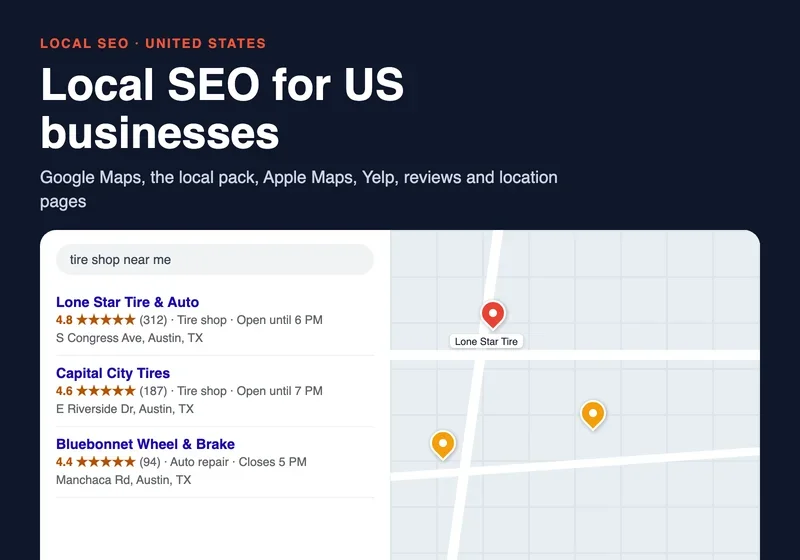
Below the pack come the regular website results, and in the map apps the customer gets a list of places with ratings straight away. Local SEO works on all of these surfaces at once.
Google splits the ranking of local results into three groups. According to Google's Business Profile help, these are relevance (how well a profile matches the search), distance (how far the business is from the searcher) and prominence (how well known the business is, which includes links to it from around the web and the number and quality of reviews). You cannot change the distance, so the work goes into the other two: how completely and accurately the business is described, and how often people write about it, search for it and review it. Google also states that there is no way to request or pay for a better local ranking.
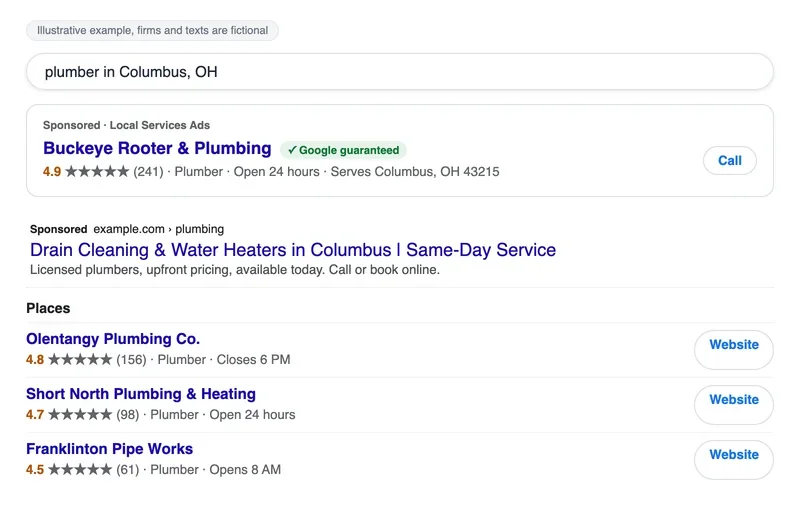
Paid results often sit above the free ones. In search they carry a "Sponsored" label, and for service businesses such as plumbers, electricians and cleaners, Local Services Ads can take the very top of the page. The ad comes first and the organic listing with a rating and reviews comes below it.
Before you change anything, do a five-minute check. Stand at the entrance to your location, open Google Maps on your phone and search for your type of business with the words "near me". Then look at the results through a customer's eyes:
- Is your company in the list, and where?
- Do the name, address, phone number and hours match reality?
- Who ranks above you, and what makes their profiles more complete: photos, services, number of reviews?
- Does the website link on your profile lead to a service or location page, or only to the homepage?
- Does your website also show up in the regular results below the map?
This article is about the free side of local search, which keeps working without a monthly ad budget. We cover paid options only where they change the plan: Local Services Ads get their own short section further down.
Google Business Profile: the foundation of Maps and the local pack
Most owners set up a Google Business Profile once and never open it again. It is the single most important local asset: the profile feeds both Google Search and Google Maps, and verification is what lets you edit the details and see how customers interact with it. Depending on your business and region, Google offers verification by phone or text, email, a live video call or a postcard with a code that typically arrives within 14 days. After you finish, allow up to 5 business days for review.
The rules for what you can put in a profile are in Google's guidelines for representing your business, and they are stricter than most owners expect. The name must be the one on your sign and stationery: no taglines, no phone numbers or URLs, no hours in the name, no needless "LLC". "Lone Star Tire & Auto" is correct; "Best Cheap Tire Shop Austin TX 24/7" is a reason for suspension. Choose as few categories as possible and make them the most specific ones: the category answers "this business IS a ...", so use "Tire shop" and add "Auto repair shop" only if you really are one. P.O. boxes and most virtual offices are not eligible.
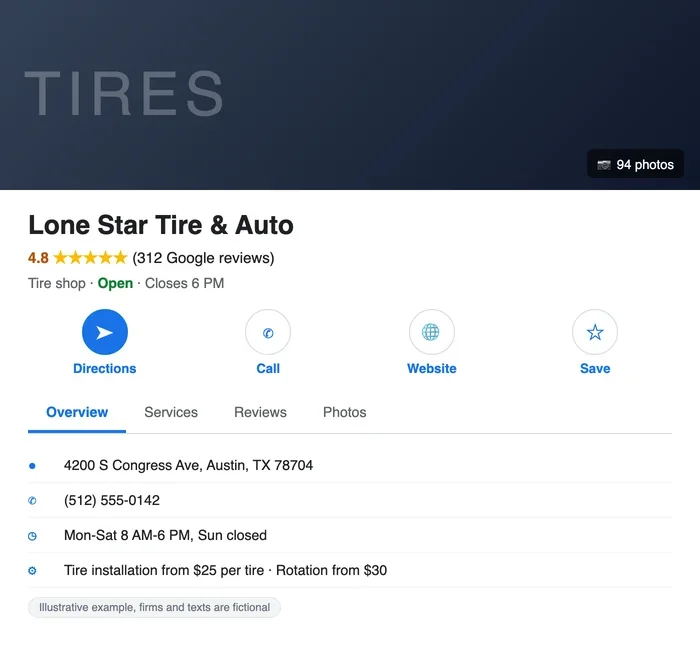
Fill in everything that applies: hours (including holiday hours), services with prices where you can, a short description, the website link, appointment link and attributes. Add your own photos: the facade and entrance so people recognize the place, the interior, the work, the team. Put the map pin right at the entrance, otherwise the directions lead to the building next door.
The profile should look alive. A post about an offer, a new service or changed hours, plus a few fresh photos every week or two, shows people that the business is open. A profile with hours from two years ago loses to a neighbor's even when the ratings are similar.
People's actions on the profile are your best local metric. In the Performance section Google shows views, calls, direction requests, website clicks, messages and bookings, and only for verified profiles. Fake activity gets you nowhere; accurate hours, fresh photos and updates raise the chance that a person picks you from the list and taps the button. A summary of the signals and what to do about each:
| Signal | Google Maps and local pack | Apple Maps, Bing, Yelp | What to do |
|---|---|---|---|
| Profile completeness | Relevance: a complete profile matches more searches | Claimed card with logo, hours, photos | Fill in hours, services, prices, photos and description |
| Match to the query | Primary and additional categories, services, real business name | Category on each platform | Pick the most specific categories; keep keywords out of the name |
| Distance | Calculated from the searcher's location | Address and pin on the map | Place the pin exactly at the entrance |
| Prominence | Reviews, ratings, links and mentions around the web | Reviews on Yelp and other platforms | Ask for a review after every job and reply to each one |
| Activity | Calls, directions, website clicks | Calls and taps on the card | Keep hours, photos and posts up to date |
| Website | Link from the profile to a matching page | Link from each listing | Send each location to its own location page |
Apple Maps, Bing Places and Yelp: the other places customers look
Google is the main platform, but not the only one. iPhone users often open Apple Maps first, and Bing Maps has its own business listings. In the 2026 BrightLocal consumer survey of 1,002 US adults, 71% named Google as a place they use to find reviews, and 45% named ChatGPT or other AI tools, up from 6% a year earlier. The takeaway is simple: your data should be right wherever a customer or an assistant might read it.
- Apple Maps: claim your location in Apple's business tools (previously Apple Business Connect). You enter the name, address, phone, category and hours, and for an existing place Apple can verify it with a call to the number on file and a four-digit code. Apple describes the tool as free, and the card shows in Apple Maps, Messages, Wallet and Siri. A place already managed by someone else can be transferred with supporting documents such as a business license or utility bill.
- Bing Places: Microsoft's redesigned Bing Places is free and can import a Google Business Profile, keeping the name, hours and contact details.
- Yelp: claiming a business page is free, and it lets you update your info, add photos and reply to reviews. Yelp ads are optional and separate.
One Yelp rule changes how you collect reviews. Yelp's automated recommendation software screens out reviews it suspects were solicited by the business, so a flood of review requests sent to Yelp can backfire. We come back to this in the reviews section.
NAP: the same name, address and phone number everywhere
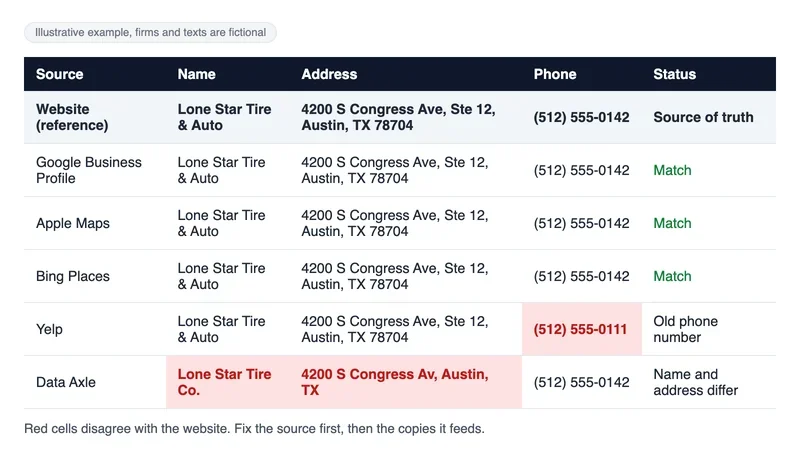
NAP stands for name, address, phone. Search engines and map apps compare this data across your website, Google, Apple, Bing, Yelp and directories, and the more matches they find, the more confidently they tie scattered mentions to one business. When every listing shows a different phone number, trust in the data drops, and customers end up calling a dead number.
The data flows through aggregators. Companies such as Data Axle, Foursquare and TransUnion (formerly Neustar Localeze) supply business data to directories, navigation systems and apps, and BrightLocal's overview of data aggregators explains who sends data where. Fixing the source helps fix the copies. Note that some aggregators charge: BrightLocal lists TransUnion at $99 per year per business profile.
Start by searching Google for your phone number and your business name in quotation marks. You will find old listings, forgotten profiles and mistakes made by others. Claim every profile you find and standardize it down to the address format and the spelling of the name. If one source says "5 Congress Ave., Suite 12" and another says "5 Congress Avenue #12", pick one version, include the ZIP code, and use it everywhere, including on invoices and in email signatures.
Places to check:
- Google Business Profile, Apple Maps and Bing Places;
- Yelp, and Facebook or Nextdoor pages where contact details are listed;
- the data aggregators above;
- industry and city directories where your company already appears (a search for your trade plus the word "directory" and your city shows which ones are active);
- the footer and contact page of your own website.
When you move or change your phone number, update every source on the same day, starting with Google. Keep the old number forwarding to the new one for at least a few months: it stays alive in reviews, on flyers and in copies of directories that update slowly.
How to build local keywords for your site and profile
A local company will almost never outrank national chains on a generic query like "car repair": the chains have far more backlinks and traffic.
The opportunity is in queries with a city, a neighborhood, a ZIP code or a landmark, and words like "near me" or "open now". You collect them by combining your type of business with a location modifier, then check them in Google autocomplete and in the Performance report of Google Search Console. A second source is your own Business Profile: the performance data shows the search terms that already led people to it.
Sort the queries into two piles. Short ones, such as a service plus "near me", go to the profile's categories and services. Combinations of neighborhood, ZIP or city with a service get their own pages on the site.
Location and service-area pages: what each one needs
A location page answers the "service plus place" query. A business with one address often needs only a strong contact page, while a company with several addresses needs a page for each. The website link on each profile should lead to the matching page; the homepage fits only a very small site. A simple test: a person who lands on the page from Maps should see within five seconds where the place is, when it is open and what the service costs.
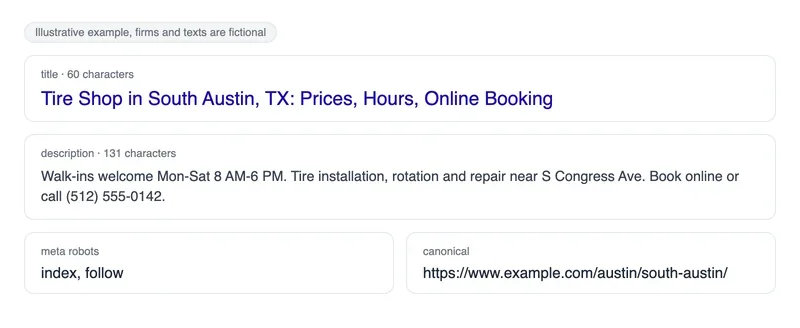
Start with the meta tags: city and service in the title and description, without a string of neighborhoods. You can check them with a meta tag parser that shows the title, description, meta robots and canonical along with the character counts.
For a tire shop in Austin a working title looks like this: "Tire Shop in South Austin, TX: Prices, Hours, Online Booking". The description carries the hours and the main reason to choose this location.
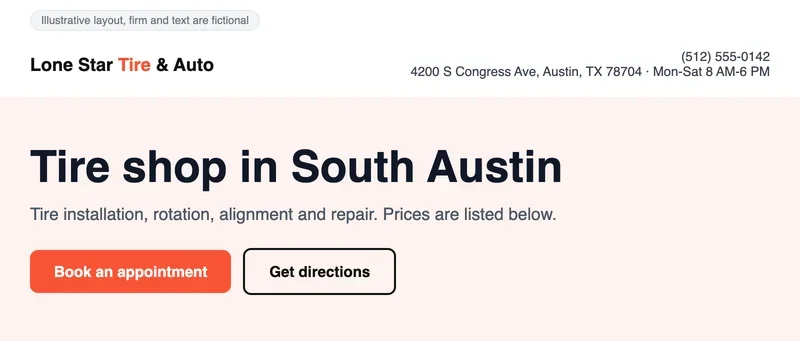
The H1 restates the main query in plain words, without a pile of place names: "Tire shop in South Austin".
What else a location page needs:
- address, phone number and hours on the first screen, as text, with a tap-to-call phone link;
- a map and directions by car or on foot, with landmarks and parking notes;
- services and prices for this location;
- photos of the facade, entrance and interior;
- reviews from this location;
- one button to book or call, and a link to directions.
A good first screen is simple: phone, address and hours in the header, visible without scrolling, and under it a headline that says what you do. In this mockup the header carries the phone, address and hours, then the H1 "Tire shop in South Austin" and two buttons, "Book an appointment" and "Get directions".
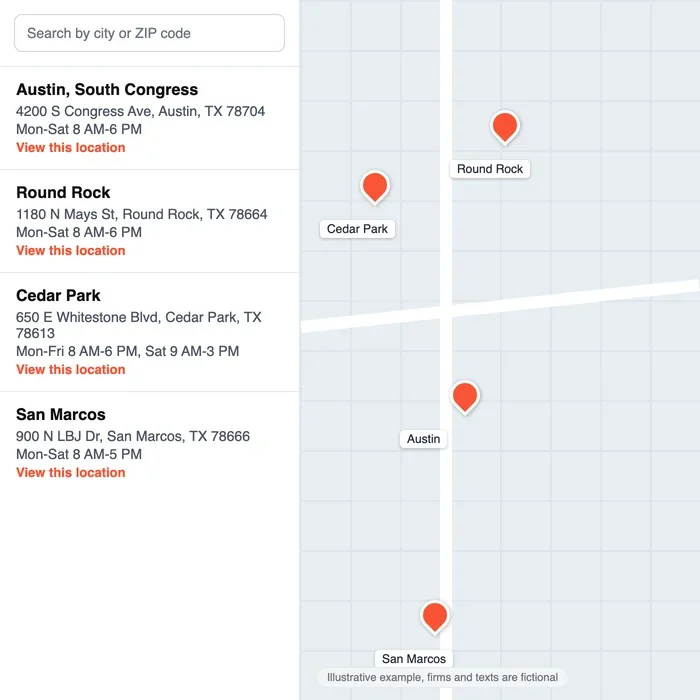
The call to action should be one and obvious: book, call or find the nearest location. On a multi-location site the "Find a location" page is a list of locations with addresses and hours next to a map, and each row links to its own location page.
Service-area businesses (a plumber, a mobile detailer, a cleaning crew) have no storefront to open a page for, and this is where owners go wrong. Google lets a service-area profile list up to 20 service areas by city or ZIP code, with the overall area no more than about 2 hours of driving from your base, and it must hide the address if customers do not visit you. For the website, create a page for an area only if you really work there and can say something specific: jobs you did, local rules or permits, prices, a real phone number. Google's spam policy calls doorway pages sites or pages created to rank for similar queries that lead people to a less useful intermediate page, and pages tailored to cities that funnel visitors to one destination are among its examples. Fifty near-identical "Plumber in [city]" pages with only the city swapped are the pattern that policy describes.
Blog posts about common problems or customer questions can link to the location page right in the text and pass weight to it.
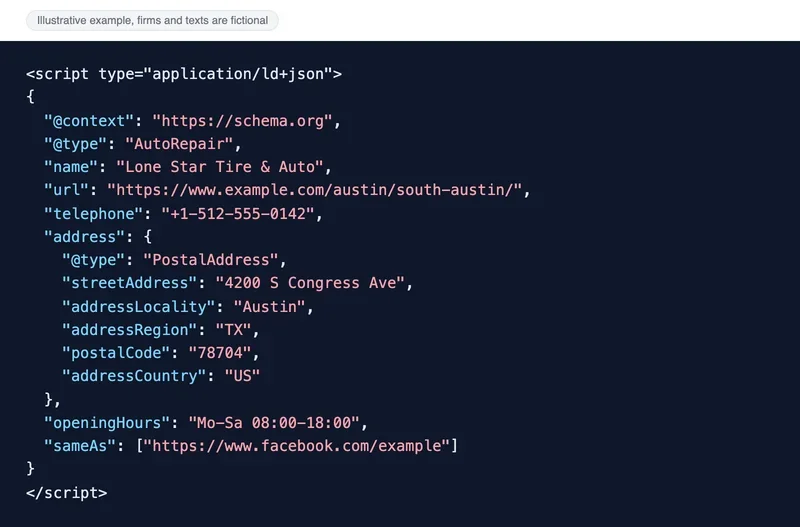
Structured data helps Google read the name, address, phone, hours and the other profiles of the company. For a local business Google documents the LocalBusiness structured data: name and address are the required properties, and telephone, URL, opening hours and geo coordinates are recommended. Use the most specific subtype available (Electrician, Dentist, AutoRepair) and the JSON-LD format, and check the result in the Rich Results Test. In this fictional example an auto repair shop is marked up with name, address, phone, hours and a link to a profile.
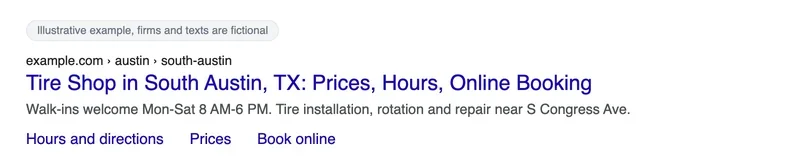
Markup does not guarantee a special look in results, but a page with a clear structure can earn extra links under its title. This is what that can look like for a location page: below the title come quick links to the sections "Hours and directions", "Prices" and "Book online".
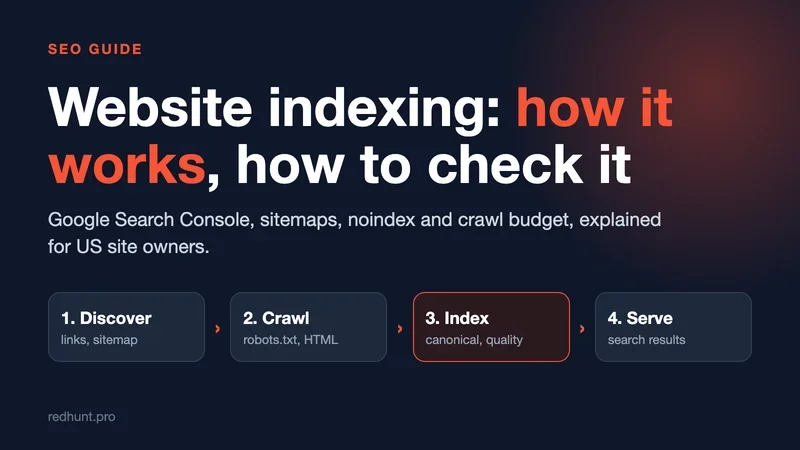
For general on-page work on a small site, from structure to content, the same principles apply as for any other site; our article on website indexing covers how to get pages into Google at all.
Reviews: how they affect your ranking and what the rules allow
Reviews change both your position and the decision a person makes when choosing from a list. Google says prominence includes the number and quality of reviews, and that "more reviews and positive ratings" can help local ranking. Customers use them too: in the BrightLocal survey 97% of consumers read reviews for local businesses, 31% will only use a business rated 4.5 stars or higher, and 74% want reviews written in the last three months.
Asking is fine, with conditions. Google lets you share a review link or QR code with customers, who must be signed in to a Google Account. Google's Maps content policy forbids reviews that are paid for, directly or in kind, and offering payment, discounts or free goods in exchange for a review or for changing or removing one. It also forbids pressuring people to leave reviews on the premises or dictating what they write, and content written because of a conflict of interest, such as by current or former employees.
The US adds a legal layer. The FTC's final rule on fake reviews and testimonials bans buying, selling or writing fake reviews, including AI-generated ones, paying for reviews that express a particular sentiment, undisclosed reviews by insiders, and review suppression through legal threats, intimidation or false accusations. The rule gives the FTC civil penalty power against knowing violators. So the safe routine is plain: ask every real customer, offer nothing in return, do not filter out unhappy customers, and never write reviews yourself or have staff do it.
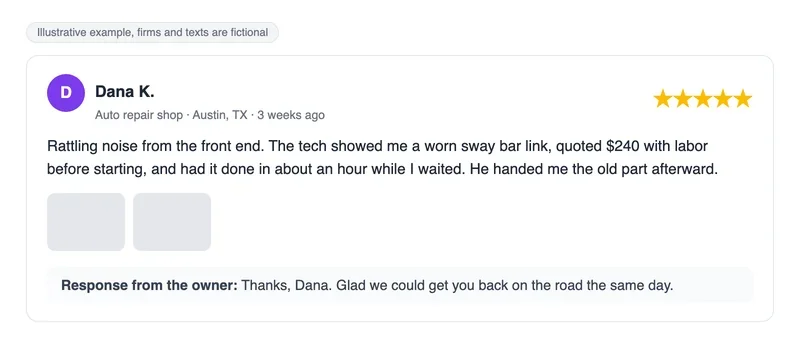
Consistency beats bursts. Ask each customer right after the job, with a link in a text message or a QR code on the receipt. Detailed reviews with prices, timing and photos help future customers more than "great service". The example below is a fictional review that says what broke, what the repair cost and how long it took.
Yelp is the exception to "ask every customer". Its software does not recommend reviews it believes the business asked for, so on Yelp keep the page accurate, answer the reviews you get, and do not run review campaigns there.
89% of consumers expect business owners to respond to reviews, and generic or templated replies put off 50% of them.
BrightLocal Local Consumer Review Survey 2026, 1,002 US adults
Reply to every review, especially the negative ones: apologize if it is deserved, say what you will do, and offer to continue by phone. Future customers read these replies, so a specific answer works better than "thanks for your feedback". If a customer writes that the technician was an hour late, a reply that explains how you changed the appointment schedule and invites them back convinces the reader more than a dozen five-star ratings. Google's own guidance on replying to reviews is to keep it brief, personal and free of promotion.
Mentions and links from your city
Search engines also judge a company's local reputation by where it is mentioned. A local business has no reason to chase a huge number of backlinks: the big players have tens of thousands of referring domains.
For a single location a few dozen mentions on local and industry sites are enough:
- the local chamber of commerce and business associations;
- city and industry directories;
- neighborhood groups and communities where people ask for recommendations;
- local blogs, newspapers and TV station sites that cover the area;
- partner sites: suppliers, neighboring businesses, event organizers;
- pages of events the company sponsors or takes part in.
The easiest mentions come from people you already work with. A supplier adds you to its dealer list, a neighboring coffee shop swaps recommendations with you, a neighborhood festival lists its sponsors. Each such mention, with an address and phone number, also strengthens your NAP.
Find the discussion places the same way you found directories: search for your trade plus "forum" or "Reddit" and your city, and read where people ask where to go when their car breaks down. A search with the word "blog" finds local authors; judge them by how recently they post and whether people in your city read them.
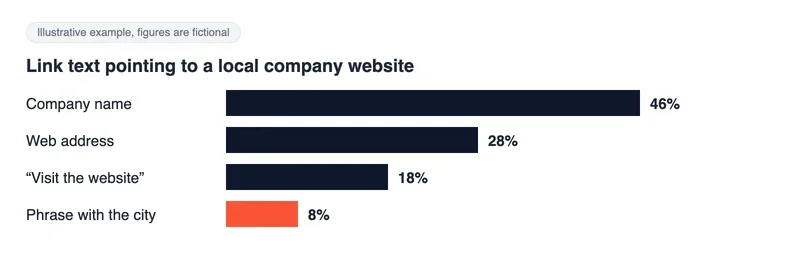
Link text should look natural: the company name, the web address, "visit the website". A set of identical links reading "tire shop in Austin" looks bought. In this fictional chart a healthy profile shows company name and address most often and a phrase with the city least often.
Technical basics for location pages
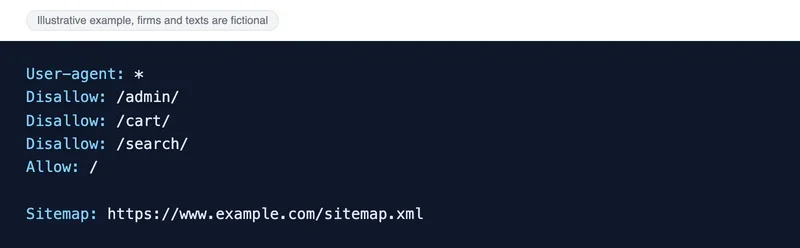
Location pages must be crawlable and indexable. In robots.txt, close the service sections and leave the location pages open. Note that robots.txt controls crawling, not indexing: a blocked page can still show up in results if other sites link to it, so use noindex when you need a page kept out. In this fictional example the admin area, cart and internal search are blocked and the sitemap address is listed at the end.
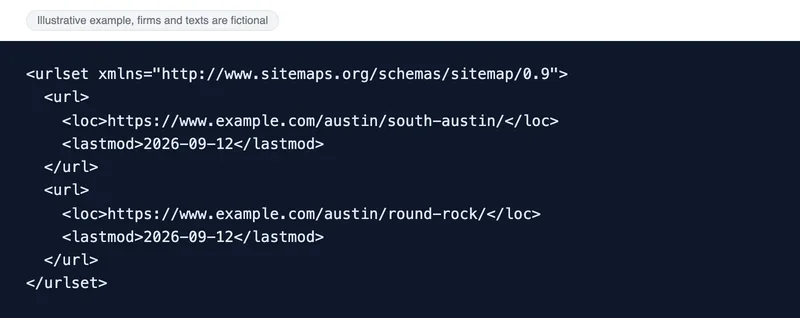
A sitemap is a file that lists your pages. Google does not require one, and a small, well-linked site can manage without it, but it is cheap insurance for a site with many location pages, and you can submit it in Search Console. In this example it holds two location pages, each with a last-modified date.
Versions generated from the visitor's location are risky for local SEO. Google's documentation on locale-adaptive pages notes that Googlebot's default IP addresses appear to be in the USA, so Google might not crawl, index or rank all your content for different locales. The page adds that Googlebot now also crawls from IP addresses outside the USA, but it still recommends separate URLs. For a multi-city site that means a separate URL for every city rather than one URL that changes with the visitor.
A common mistake on multi-city sites is a "choose your city" pop-up that covers the content or redirects automatically. A person coming from Maps lands on the wrong page and leaves, and the crawler indexes only the page it was redirected to. Let people choose a city with ordinary links to separate pages.
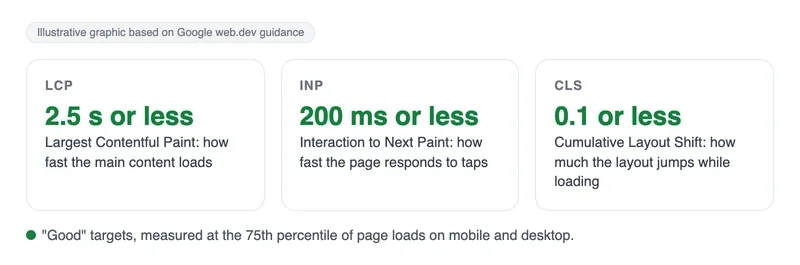
Most local searches happen on phones, often on the move. Google's Core Web Vitals set the targets: Largest Contentful Paint within 2.5 seconds, Interaction to Next Paint of 200 milliseconds or less and Cumulative Layout Shift of 0.1 or less, measured at the 75th percentile of page loads. Check them in PageSpeed Insights for your key location pages.
Separately, look at the page the way a customer on a phone does: call and directions buttons within reach, readable text, no sideways scrolling.
How to measure local SEO results
A map position means little on its own, because results depend on where the person stands. The main metric is customer actions. The Performance section of your Business Profile shows calls, direction requests, website clicks, messages and bookings, and the search terms that led people to the profile.
In Google Analytics, set up key events for taps on the phone number, the directions button and form submissions, and add UTM tags to the website link on your profile so that those visits are separated from the rest of your organic traffic. The UTM parameters source, medium and campaign are required, and they are case-sensitive, so keep the spelling identical across links. A location-based report shows which cities your location-page visitors come from.
Search Console gives a third view. Its Performance report shows clicks, impressions, click-through rate and average position, which you can break down by query, page, country and device. If a location page starts getting impressions for its "service plus neighborhood" queries, Google has understood what the page is about.
Check your rankings for local queries from the right place: results seen from an office in another city tell you nothing. A rank tracker with city selection is built for that.
Compare the data month to month. More actions on the profile and more visits to location pages mean the work pays off, even if the rank at a specific street corner jumps around.
What it costs, and when Local Services Ads make sense
Prices below are market reference points from public sources, not quotes, and they vary by city and trade. For ongoing agency work, one agency's 2026 pricing guide lists $500-$900 per month for a basic one-location package, $900-$2,000 per month for one to three locations with monthly content and review support, and $2,000-$5,000 or more for four or more locations. One-time work in the same guide runs $750-$3,000 for an audit, $300-$800 to set up or overhaul a profile per location, and $1,200-$5,000 for a bundle of 3 to 10 local landing pages. If you do it yourself, listing and review tools such as BrightLocal start at roughly $31-$65 per month for one location depending on plan and billing, and it sells citation building from $2 per citation.
Local Services Ads are the paid shortcut for service trades. With Local Services Ads you pay per valid lead, such as a call, a message or (in the US and Canada) a booking request, instead of per click, and lead prices vary by location, job type, type of lead and bidding mode. A software vendor's 2026 guide for plumbers puts them at $25-$80 or more per lead, which is a vendor's range, so confirm it in your own account. Google is also moving Local Services Ads into Google Ads as a Performance Max campaign type with pay-per-lead goals, starting with US home and storefront service providers in August 2026, so expect the interface and some bidding options to change.
The two work together rather than compete. Ads pay for the top of the page while you wait; a verified profile, consistent data and reviews are what keep calls coming when you stop paying.
A work plan for the first three months
Order matters more than speed: build the base first, because the other signals sit on top of it.
- Month one: verify your Google Business Profile, claim Apple Maps, Bing Places and Yelp, fill in every field, and run a NAP audit by phone number and business name.
- Month two: local keywords, a location page for each address or a real service-area page, structured data, key events in Google Analytics and UTM tags on the profile link.
- Month three: a steady routine of review requests and replies, 10-20 mentions in local directories and chamber or partner sites, fresh photos and posts on the profile.
- After that: a monthly check of profile actions, local rankings and listing data.
The profile reacts to updates and reviews faster than the website, which still has to be crawled and indexed. So look for the first changes in the Business Profile performance data.
If you have several locations, repeat the process for each one: every address gets its own profile, its own reviews and its own page.
Frequently asked questions
How many reviews do I need to rank in the local pack?
There is no magic number. Google says prominence, which includes review count and quality, is one of three ranking factors alongside relevance and distance. Compare yourself with the businesses that rank above you in your area and keep collecting reviews steadily: recent reviews matter, since 74% of consumers in the BrightLocal survey look for reviews from the last three months.
Can I offer a discount for a Google review?
No. Google's policy prohibits offering payment, discounts or free goods in exchange for reviews, and the FTC rule bans compensation that is conditioned on a particular sentiment. You can ask every customer to leave an honest review, and you can make it easy with a link or a QR code.
Do I need Apple Maps, Bing Places and Yelp if Google brings most of my calls?
Yes, at least a claimed, correct listing. They are free, take a few hours in total, and keep your data consistent where phone users and AI tools may look. Your Google Business Profile statistics and UTM tags will show which platform actually brings calls to you.
Can I rank in Google Maps without a storefront?
Yes, if you are a service-area business. You create one profile, hide the address if customers do not visit you, and list up to 20 service areas within about 2 hours of driving from your base. A P.O. box or an unstaffed virtual office does not qualify as an address.
Local Services Ads or SEO: which one first?
If you sell emergency or high-ticket home services, ads can bring calls in days while SEO builds up, and you pay only for valid leads. The profile, reviews and NAP work help with both, so start there either way, and decide on ads once you know your cost per lead and how many leads you can handle.
Дата публикации:
Задать вопрос
Вопросы и ответы
Пока нет опубликованных вопросов. Задайте первый — после модерации он появится здесь.
Вам также может понравиться
Все статьи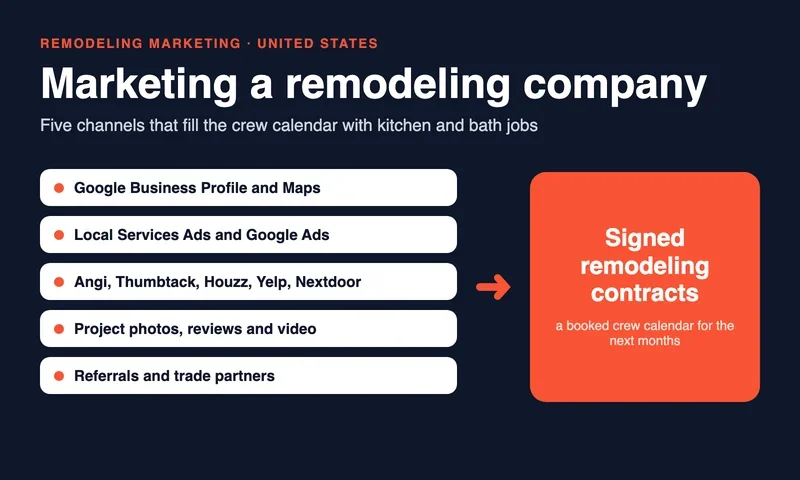
Home services
Marketing a Remodeling Company: How to Get Kitchen and Bath Jobs in the US
How US remodelers get jobs: Google Business Profile, Local Services Ads, Angi and Thumbtack, license display, EPA lead rule, portfolio, referrals, metrics.

Law firms
SEO for lawyers: how to promote a law firm website on Google
How to promote a law firm site on Google: practice and city pages, attorney bios, bar advertising rules, reviews, Business Profile and Local Services Ads.

Aesthetic medicine
Plastic surgery marketing: how to promote a practice within FTC, HIPAA and state board rules
Plastic surgery marketing in the US: FTC rules, HIPAA photo authorization, board certification claims, Google and Meta ad policies, reviews and financing.
Technical SEO
Website indexing: how it works, how to check it and how to speed it up
How Google indexes a site, how to check pages in Search Console, and how to speed it up with sitemaps, URL Inspection and IndexNow.