

SEO for an Online Store: Catalog Structure, Filters and Product Pages
Ecommerce SEO runs on the catalog: categories capture groups of queries, in-demand filters become landing pages, and product pages carry original copy and Product markup. Sort and tracking URLs are kept out of the crawl so Google spends its time on products. Below is the order of work for US stores, from catalog structure to Merchant Center free listings and monitoring.

How does SEO for an online store differ from promoting a regular website?
A service website has dozens of pages. An online store has thousands, and almost all of them come from three templates: the category page, the product listing with filters, and the product detail page. That is why most of the work is about templates and rules. One mistake in the product page template repeats across the whole catalog, and one well-designed rule for filters can create hundreds of useful landing pages. A store works like a storefront: a shopper who arrives from Google should land on the right shelf, not on the homepage.
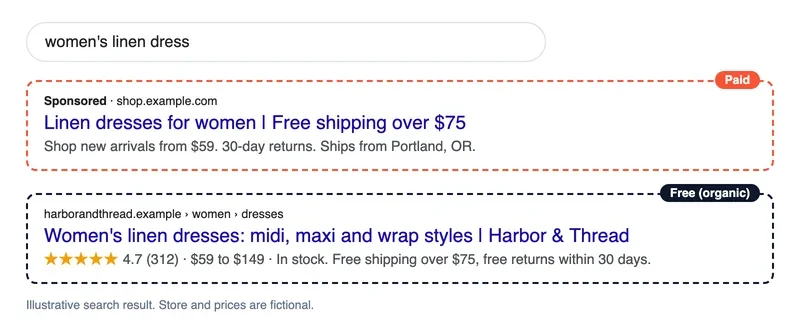
Search results for product queries have two parts. At the top and around the results are ads the store pays for per click; below them are organic results, ranked by relevance and quality. In the mockup of a search for "women's linen dress," the ad sits in a "Paid" frame and the store's own result below it sits in a "Free (organic)" frame. Google also shows free product listings from Merchant Center in places such as the Shopping tab and Images, which we cover below.
Organic traffic builds slowly. Changes to new pages usually show up a few weeks after Google indexes them, and noticeable growth takes months. In return, clicks cost nothing, and traffic does not stop the day your ad budget does. This article covers search only. Paid shopping campaigns, email and marketplaces are a separate topic. If you are not sure that Google can index your pages at all, start with our guide to getting a website indexed.
How should you map search queries to catalog pages?
Catalog structure starts with queries. Collect everything people type to find your products: generic product names, brands, models, attributes such as color, material and size, and uses or occasions. Good sources are Google Search Console (the Performance report shows the queries you already get impressions for), Google autocomplete and "People also ask," your store's internal search log, and the keyword tool you already use. Then group the queries. If the same competitor pages rank for two phrases, one page of yours can target both.
Each group needs its own type of page. A category page that answers a brand query will usually lose to a competitor with a dedicated brand page. A simple mapping chart keeps the team honest.
| Query type | Example | Page that answers it |
|---|---|---|
| Generic product | "women's sneakers" | Category or subcategory |
| Product and brand | "Nike women's sneakers" | Brand filter landing page |
| Product and attribute | "white leather sneakers" | Attribute filter landing page |
| Use or occasion | "wedding guest dresses" | Hand-curated collection |
| Model or SKU | "Nike Pegasus 41" | Product page |
| Question | "how to choose running shoes" | Buying guide that links to categories |
Buying guides support the catalog: they answer questions and send readers to categories through links. Competitor research helps validate the plan. Backlink and visibility tools show which competitors in your niche have more referring domains, more keywords and more traffic. The most useful report is the one for top pages, because it shows which sections drive their traffic. Sometimes it is a narrow category such as wedding guest dresses. The keywords report shows where that traffic comes from: beyond brand searches, it is usually broad queries like "summer dresses" or "swimsuits."
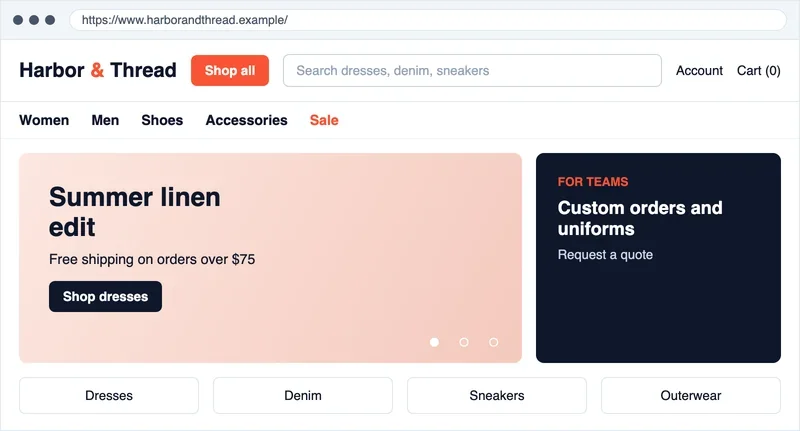
Look at your competitors' first screen too. Count the clicks from the homepage to a specific model: the fewer, the easier it is for shoppers and for crawlers. Google's own guidance says to link from menus to category pages, from categories to subcategories and from subcategories to every product page, because crawlers find pages by following <a href> links and generally do not use a site's search box. See Google's ecommerce site structure guide.
Which filters should become landing pages?
Filters create the most new URLs in a store, and the most clutter. Two dozen attributes produce an enormous number of combinations, and almost none of them has search demand. Only combinations with demand and enough products should be open to indexing; the rest exist for shoppers only. A filter combination is worth a landing page when:
- people search for it (check Search Console and your keyword tool), or similar pages from competitors rank on the first page
- the results page has enough products to choose from and will not go empty after a sale
- the URL is permanent and readable, for example
/women/sneakers/white-leather/instead of a string of parameters - the page has its own title, H1 and short intro written for that query
- a plain HTML link points to it from a category page or a "Popular collections" block
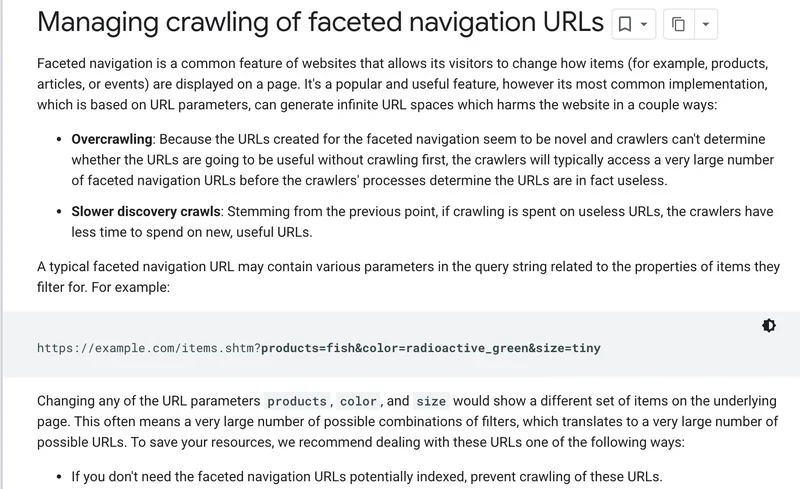
For all other combinations, follow Google's documentation on faceted navigation. It warns that parameter-based filters can create practically infinite URL spaces, that crawlers may fetch a very large number of them before deciding they are useless, and that this slows the discovery of new pages. If you do not need filter URLs indexed, it recommends blocking them with robots.txt or using URL fragments for the filters. It describes rel="canonical" and nofollow as less effective in the long term. If you do want them indexed, use the standard & separator, keep filters in the same order in the URL, and return a real 404 when a combination has no products.
Here is how the problem scales, as a hypothetical. Suppose one category lets shoppers combine 12 colors, 10 sizes, 8 brands and 6 price bands. That is 12 x 10 x 8 x 6 = 5,760 combinations for a single category, and every extra filter multiplies the number again. Out of those, a store might open 15 or 20 for indexing, such as brand pages and the two or three attributes people actually search for, and keep the rest out of Google's crawl path.
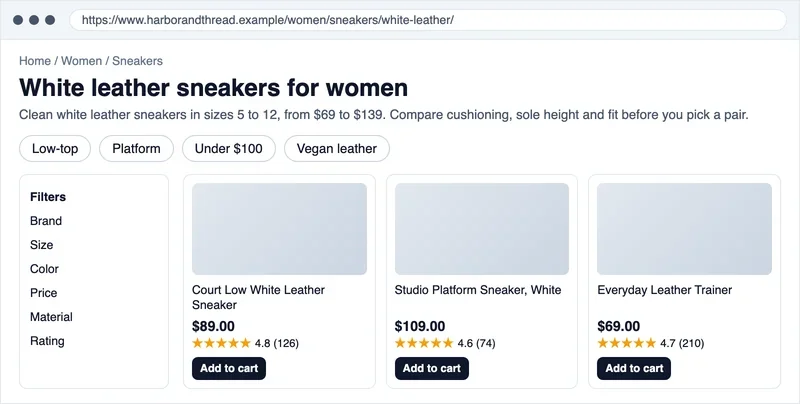
A filter landing page still looks like a normal product listing. It has a custom title, a short intro and links to related collections above the grid, and the products are the same as in the parent category. In the mockup below, the page for "white leather sneakers" has its own H1, a two-sentence intro, collection links such as "Low-top" and "Under $100," a filter panel on the left, and product cards with a price, a rating with the review count and an "Add to cart" button.
Duplicates, sorting and pagination: canonical, robots.txt and noindex
Duplicate URLs appear in a store on their own. A product listed in several categories, sort orders, items-per-page settings, tracking parameters, session IDs and comparison views all create extra addresses for the same content. Google's ecommerce URL structure guide explains the cost: the crawler may retrieve the same content several times, which slows crawling and loads your server for no benefit, and a poor URL design can cause content to be missed. Its examples include /product/black-t-shirt and /product?sku=1234 returning the same page, which Google cannot detect from the URL alone.
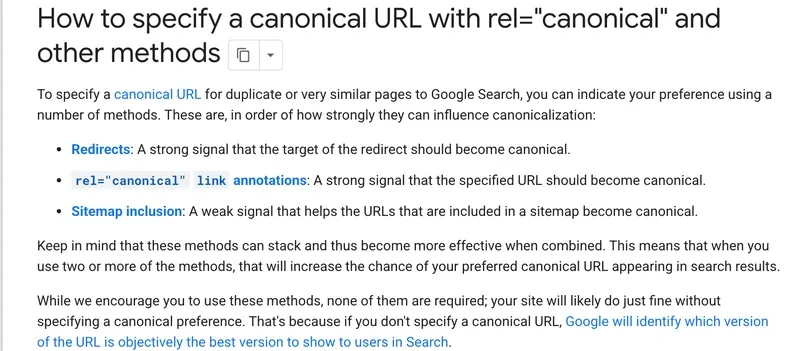
Google's tool for choosing a preferred address is the canonical URL. Google's page on canonicalization ranks the methods: redirects are a strong signal, rel="canonical" annotations are a strong signal, and including a URL in a sitemap is a weak signal. It also says that you should not use robots.txt for canonicalization, because Google may still index a disallowed URL without its content, and that every canonical page should carry a self-referencing canonical. Its own example is a dress page that you would rather have shoppers reach through a clean product URL than through an address with a gclid parameter. If you skip all of this, Google picks the version it considers best on its own.
The simplest fix for products in several categories happens at the platform level. Pick a primary category per product, then build breadcrumbs and a permanent URL without the category path, for example /product/court-low-white-leather-sneaker/. Links from sale pages, collections and brand pages then all lead to the same URL, and the duplicate never exists. Google also recommends descriptive words in URL paths, ?key=value parameters and lowercase URLs.
| URL type | Example | What to do |
|---|---|---|
| Sort order and view | ?sort=price, ?view=list | Block in robots.txt, or point a canonical to the category |
| Items per page | ?limit=48 | Block in robots.txt, or canonical to the category |
| Tracking and session parameters | ?ref=, ?sid=, ?gclid= | Do not link to them internally; canonical to the clean URL |
| Product in several categories | /jackets/item-1/ and /sale/item-1/ | One primary URL; 301 redirect or canonical for the others |
| Pagination | ?page=2 | Keep crawlable; each page gets its own URL and its own canonical |
| Filter with no search demand | ?color=red&size=8 | Block in robots.txt or use noindex |
| Empty filter combination | Filter with no products | Return a real 404 |
| Cart, checkout, account | /cart/, /checkout/, /account/ | Disallow in robots.txt |
Do not block pagination. On page two and beyond, the crawler finds products that are not linked anywhere else. Google's pagination guidance says each page needs its own URL (for example ?page=2), pages should be linked to each other with <a href>, and the first page should not be used as the canonical for the rest. It also says Google no longer uses rel="next" and rel="prev", and that pages in a sequence may share the same title and description. A "Load more" button or infinite scroll without real links can hide part of the catalog: Google's crawlers do not click buttons or trigger JavaScript that needs a user action. For filters and sort orders, the same page suggests a noindex robots meta tag or a robots.txt rule.
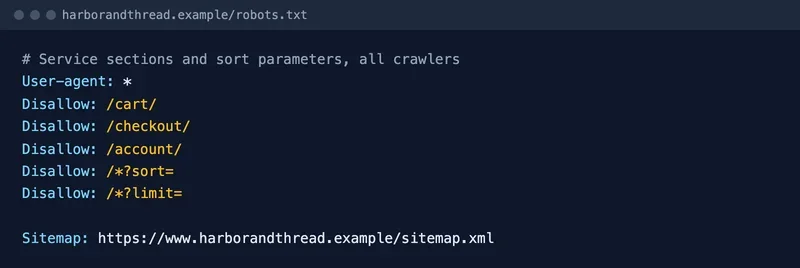
Block service sections right away. In the robots.txt below, the line User-agent: * means all crawlers, and the Disallow lines close the cart, checkout and account sections and the sort and limit parameters. Never disallow the catalog itself, the category pages or the filter landing pages you want indexed. The file should also point to your sitemap.
How do you keep Googlebot from wasting crawl on a large catalog?
Crawl budget is an abstract topic for a small store, and Google says so itself. Its crawl budget guide is aimed at sites with 1 million or more unique pages that change about weekly, sites with 10,000 or more pages that change daily, and sites where a large share of URLs sit in Search Console as "Discovered - currently not indexed." It adds that these numbers are rough. If your store is smaller and new products get crawled the day they are published, a current sitemap and a regular look at the Page indexing report are enough. If you do fall into those groups, the guide's main advice is to consolidate duplicate content, block unimportant URLs with robots.txt (it advises against noindex for this purpose, because Google still has to fetch the page to see the tag), and return 404 or 410 for permanently removed pages.
To see where crawling goes, open the Crawl Stats report in Search Console. Google describes it as an advanced tool and says sites under a thousand pages should not need it. For bigger catalogs it shows requests by response code and file type, and it counts each hop of a redirect chain as a separate request. If the crawled URLs are full of sort orders and random filter combinations, cleaning up duplicates will pay off in indexing speed.
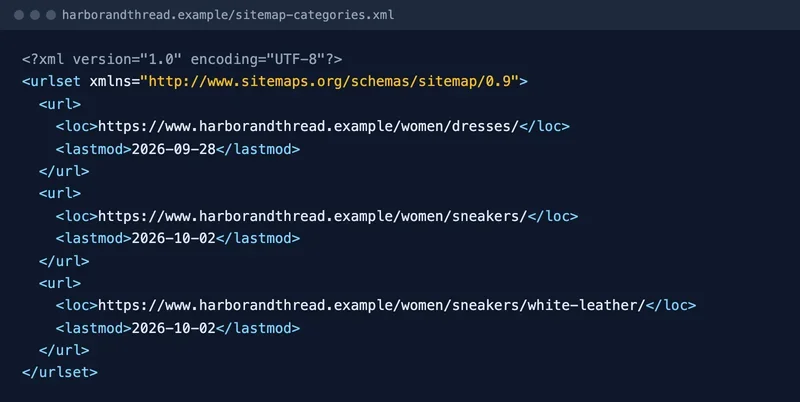
A sitemap tells the crawler which URLs matter. For a store it is convenient to split it by page type: categories, filter landing pages, products and articles. Include only canonical URLs that return 200. According to Google's sitemap guide, a single sitemap is limited to 50,000 URLs or 50 MB uncompressed, Google ignores the priority and changefreq values, and it uses lastmod only if it is consistently and verifiably accurate. So change lastmod when the main content, structured data or links on the page change, not every time a crawler visits.
Discontinued products slow crawling down too. If an item is temporarily out of stock, keep the page, set its availability to out of stock, and offer similar models and a back-in-stock notice. If it is gone for good, return a 404 or 410, or 301 redirect to the model that directly replaces it.
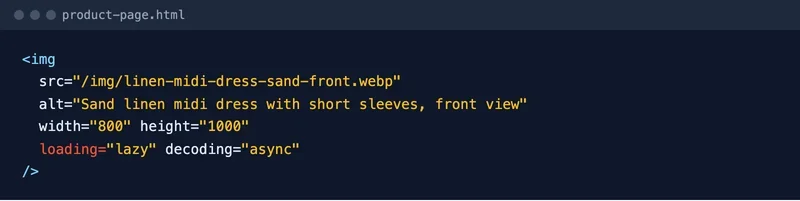
Speed affects both crawling and customers. Images give the fastest gains: compressed formats, sizes matched to the screen and lazy loading. The snippet below has a descriptive alt attribute, explicit width and height, and loading="lazy", so the image loads when the shopper scrolls to it. Use the model name and the view in the alt text, not a generic phrase like "product image."
Test speed by template: category, filter and product pages are usually slower than the homepage. Among the Core Web Vitals, Interaction to Next Paint (INP) replaced First Input Delay, as the Chrome team announced on web.dev, so measure responsiveness with INP. Test the mobile layout separately: on a phone the filters hide behind a button, the size table does not fit and the buy button drops down the page. Walk from a category to the cart on your own phone before you look at any score.
What should a product page include?
The product page answers queries about a specific model and makes the sale. Manufacturer copy appears on dozens of other sites, so write your own description: what the product is for, who it fits, how it differs from similar models and what its limits are. A reliable title format is "type + brand + model + key feature," for example "Court Low White Leather Sneaker, Women's." Put specifications in a table so they are easy for people and crawlers to read. A product page also needs:
- photos from several angles and in use, with alt text that includes the model
- price in USD, availability and the delivery estimate next to the "Add to cart" button
- size and color options on one page, if the shopper chooses them there; for apparel add a size guide and fit notes
- reviews and questions from real buyers, which add natural text in customers' own words
- blocks of similar and related products, which also serve as internal links
Reviews help even when you only have a few. The most useful ones are about that exact model, with a rating and a date, plus the store's replies to questions.
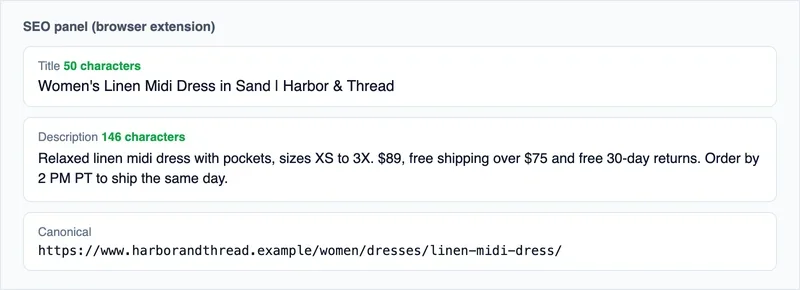
Titles, descriptions and H1s for thousands of pages come from templates, while main categories are written by hand. A template should include the name, brand, key attribute and a commercial detail such as free shipping. A browser SEO extension makes the result easy to check: in the mockup below, you can see the title length, the description length and the canonical URL of a product page.
The H1 of a category should match what shoppers search for. If a section has two common names, compare both in Search Console or your keyword tool and pick the one with more demand. In the mockup, the page shows breadcrumbs, the H1 "Women's dresses," the product count and a row of links to curated collections.

How do Product and Offer structured data help?
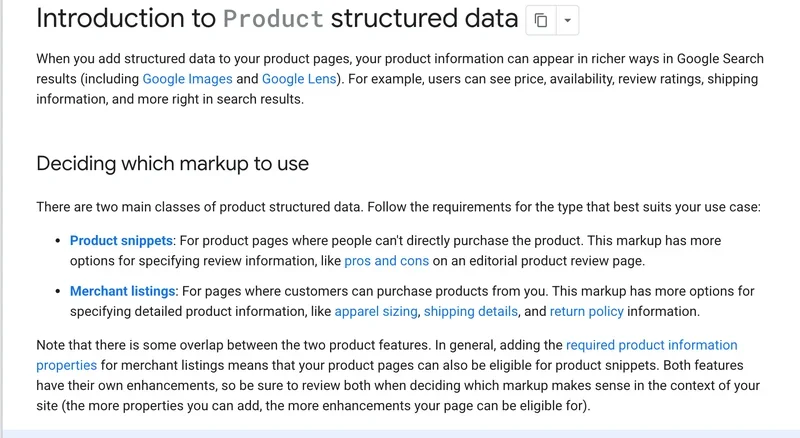
Structured data lets Google read the price, availability, ratings, shipping and returns of a product without guessing. Google's introduction to Product structured data separates two classes: product snippets, for pages where people cannot buy the product directly, and merchant listings, for pages where customers can purchase it. Merchant listings support more detail, such as apparel sizing, shipping details and return policy. Google also says it recommends adding policies for the whole business under Organization markup.
The technical rules sit on the merchant listing documentation. The required properties are name, image, offers and, inside the offer, price and priceCurrency (a three-letter ISO 4217 code, so USD for dollars). Merchant listings need an Offer, because the store must be the seller. Only pages where a shopper can buy a product qualify, the page must focus on a single product or variants of one product, and Google recommends marking up product pages rather than category pages. If you sell in more than one currency, use a distinct URL per currency. For sizes and colors, Google has separate product variant markup built on ProductGroup.
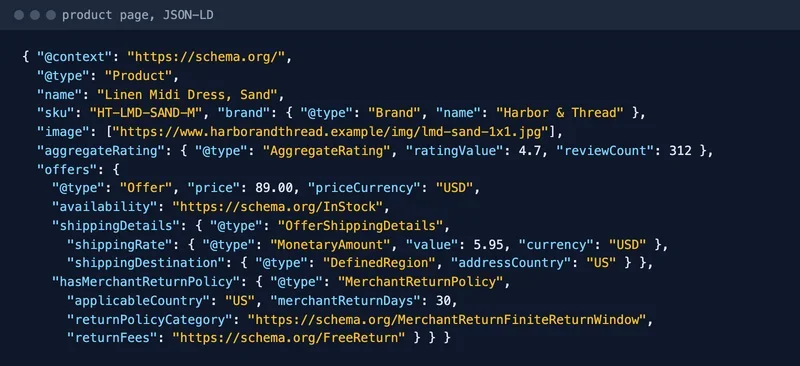
Shipping and returns can be marked up too. MerchantReturnPolicy describes return windows, fees and methods, and ShippingService describes costs and delivery times. A store-wide policy goes under Organization; a product-specific override goes under the Offer. The example below combines the common pieces for a US apparel store: price in USD, availability, a flat $5.95 shipping rate to the US, and a free 30-day return window.
Validate the markup with the Rich Results Test, deploy it on a few pages, check them with the URL Inspection tool, and only then roll it out across the catalog. Markup must match what the shopper sees on the page: if the price or stock in the code differs from the page, fix the template, not the validator warning. Last, one thing ruins a product page on a phone: a full-screen pop-up that covers the product on arrival. Shoppers close the tab, and the bounce rate rises.
Which trust signals matter: prices, shipping, returns and contact details?
Google does not publish a list of "store trust factors" for organic ranking, so treat this section as the minimum a real shopper, and Google's shopping policies, expect. Prices are shown in USD, with the total cost clear before checkout. Shipping cost and speed are visible on the product page and in the cart. The return policy is easy to find and matches what you actually do. Contact details are real: a working email, a phone number with business hours and a physical business address.
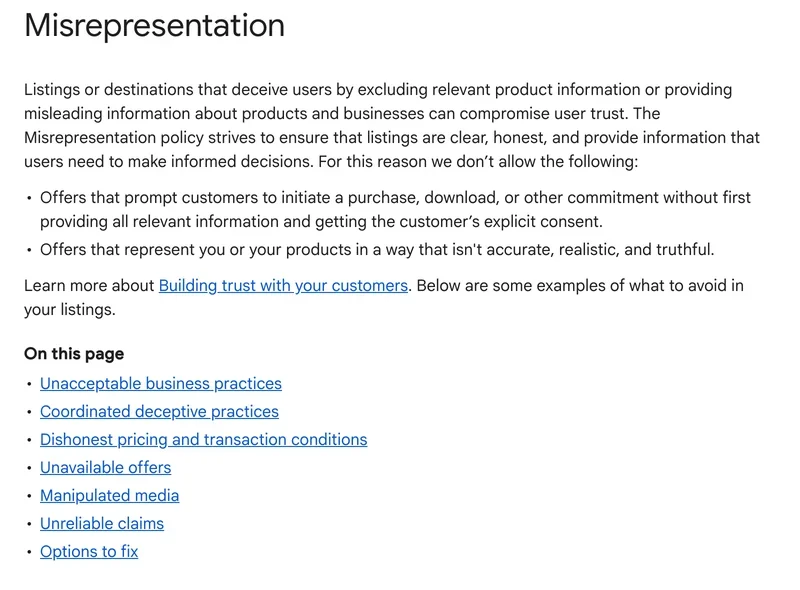
Google's Merchant Center Misrepresentation policy makes this concrete. Among the practices it does not allow are failing to disclose the total price including taxes, fees and surcharges, not disclosing all applicable shipping costs (including return shipping when the return address differs from the business address), presenting a false identity or contact information, hiding the real location products ship from, and denying a return despite a policy that allows it. The page says Merchant Center accounts can be suspended for serious violations.
US law adds a shipping rule. The FTC's Mail, Internet, or Telephone Order Merchandise Rule, often called the 30-day Rule, requires a reasonable basis for any shipping time you state or imply, and a reasonable basis to believe you can ship within 30 days if you state none. If you cannot ship on time, you must get the customer's consent to the delay or refund the money. Check your delivery estimates against your real fulfillment speed, and ask your attorney how the rule applies to your store.
A good test is to behave like a mystery shopper. Place an order, call the number on the contact page during business hours, ask about a return, and see how long the answers take. A real customer does the same thing.
The footer carries much of this. Shipping, returns, order status, sizing, contact and legal pages should be one click from every page, for shoppers and crawlers alike. If there is too much to fit, move it to separate pages and keep the links in the footer. In the mockup, the footer groups customer care links, company documents, payment methods and the contact block with hours in Pacific time.

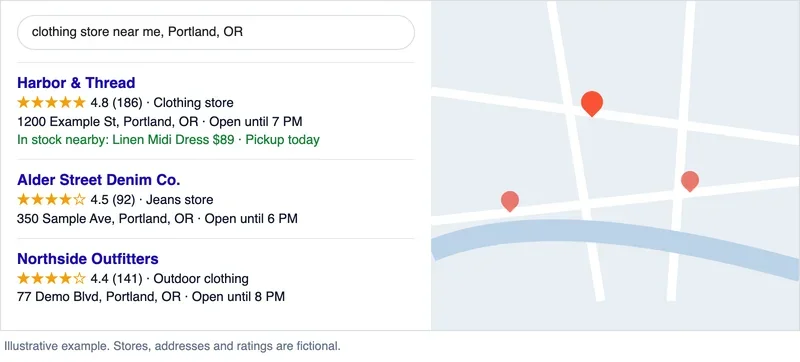
If the store has a showroom or pickup location, claim and verify a Google Business Profile so the address shows on Search and Maps. Google says adding or claiming a profile is free. We cover the details in our guide to local SEO, and Google's own steps are in Add or claim your Business Profile. For searches that include "near me" or a city name, Google shows a block of businesses with a map, and a complete profile with the right address, phone number and hours helps you appear there.
If you ship to several states, give shipping terms for each region on one clear page, and show delivery time and cost for the shopper's ZIP code at checkout. Reviews on third-party platforms matter as well. Replying to reviews, especially negative ones, shows shoppers that someone is behind the store; do it on Google and on any other review site where your store appears.
How do Google Merchant Center free listings and Shopping fit in?
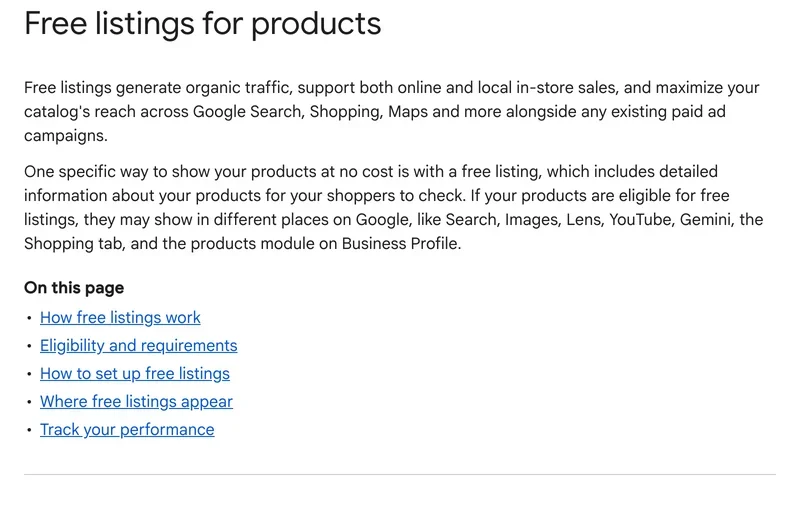
Many guides treat Google Shopping as an ads-only channel. It is not. According to Google's free listings help page, products can appear at no cost on Search, Maps, Gemini, YouTube, the Shopping tab, Google Images and Google Lens, and free listings support both online and in-store sales. For a new Merchant Center account, free listings are on by default. The page also says free listings are for product pages, not homepages, policy pages or category pages, and that turning them on does not guarantee your products will be shown.
Most of the required attributes are what you would expect: id, title, link, image link, price, description and availability, plus brand and GTIN or MPN where they exist. For apparel and accessories, color and size are required too, and variants are tied together with item_group_id. Google also asks you to add return policy information to your website so returns can show next to your products. If you use both a feed and on-page structured data, Google's product documentation says the combination maximizes eligibility and helps it verify your data. The recurring problem is a feed that disagrees with the storefront: the feed says one price or stock level and the page says another. Automate feed updates from your inventory system, and check the Needs attention tab on the Products page after every large catalog change.
What should you know about Shopify, WooCommerce and BigCommerce?
Platforms handle many technical details for you, but not the strategic ones. Google's URL structure guide says that if you use an ecommerce platform, you can most likely skip the URL-design section because the platform has probably considered these issues. Still, the platform decides what you can change, so check its limits before you plan filter landing pages.
- Shopify. You can edit titles and meta descriptions per page, and Shopify's help center advises keeping titles under about 60 characters and descriptions near 160. The theme file robots.txt.liquid lets you add crawl rules and sitemap URLs, but Shopify calls it an unsupported customization, and warns that a wrong edit can cost all your traffic. Test any change on a duplicate theme first.
- WooCommerce. The platform's code generates Product, Offer, Review and BreadcrumbList markup in JSON-LD, according to its code reference. Run a product page through the Rich Results Test anyway, since themes and plugins can change the output, and add shipping and return markup if your SEO plugin does not.
- BigCommerce. Filters come from Product Filtering, also called faceted search. In BigCommerce's developer documentation, facets are returned only if the merchant has enabled product filtering and marked the facets as visible, and querying them requires a Pro or Enterprise plan. Decide which filter pages you want indexed before you turn facets on.
Amazon and other marketplaces: compete or cooperate?
For many product queries, a marketplace or a big-box retailer will be one of your competitors in the results. Do not guess: search your twenty most valuable category and product queries in a private window, write down who ranks, and note which results are marketplaces, which are brands selling direct and which are specialist stores like yours. The gaps are your opportunity. A marketplace listing rarely has your buying guides, your fit notes, your own photos or your return experience, and those are the things your category and product pages can do better. Selling on a marketplace as well is a business decision, not an SEO one, so count its fees and its customer ownership before you decide, and keep your own site's prices and product data consistent with what you publish there.
Links and mentions of the store
Links act as recommendations: the more reputable sites mention your store and its sections, the more confidently search engines treat your categories as relevant. Buying link packages is risky, so focus on mentions you can earn. Look at which pages of your competitors attract links. That shows what type of content makes other sites mention them: size guides, buying guides, original data, gift lists.
Anchor text shows how natural a profile is. A healthy one is dominated by brand names, bare URLs and words like "here," while hundreds of identical commercial anchors point to purchased links. Typical sources of mentions in the US include:
- industry directories and local chambers of commerce, plus your Google Business Profile and Yelp listing if you have a physical location
- forums and communities around your categories, such as running, outdoor or parenting groups
- reviews by bloggers and in the press, and local or niche media
- "Where to buy" pages on the sites of brands whose products you carry
How do you track rankings and site health?
You can see SEO results in a store in three places: indexing, rankings and revenue. In Search Console, open the Page indexing report and check the not indexed pages. Google's Page indexing report help says it is fine for a URL to be unindexed for the right reasons, such as a robots.txt rule, a noindex tag, a duplicate or a 404 for a removed page, and that all your important URLs should be indexed. It also notes the report lists example URLs up to a limit of 1,000.
Track rankings by query group: categories, filter landing pages, product pages and branded queries separately. That shows which template worked and which one dropped after a release. Compare two to three weeks before and after a template change; one day of data proves nothing, because results fluctuate. RedHunt rank tracking is built for regular checks of this kind, with trends and a comparison against competitors.
Technical errors in stores usually show up after releases: a canonical tag breaks, filters stop working, product pages start returning 404. RedHunt Checker watches the technical health of a site and shows how changes affected visibility. In Google Analytics, set up ecommerce tracking and look at revenue by organic landing page: it shows which categories earn money. Here is a plan for the first month:
- Collect queries and sort them by page type, as in the table above.
- Check the Page indexing report for excluded pages and duplicates.
- Close service sections in robots.txt and handle sort and tracking parameters.
- Pick 10 to 20 high-demand filters and turn them into landing pages.
- Rewrite title, H1 and product page templates, and add Product and Offer markup with shipping and returns.
- Check pricing, shipping terms, return policy, guest checkout and the phone number.
- Set up a Merchant Center feed with automatic updates and start monitoring product pages.
Frequently asked questions
Can I promote an online store on my own?
Yes, if someone on your team knows Search Console and can edit the store's templates. Start with the technical basics: duplicates, service sections and the sitemap. Then improve the categories and product pages with the highest demand. Filters and links are the hardest to do alone, because mistakes there are expensive and not obvious right away.
How much does SEO for an online store cost?
It depends on catalog size, competition and who makes the changes. As an illustration only, not a quote: a one-time audit might run from a couple of thousand to several thousand dollars, and an agency retainer for a mid-size store might run from about $2,500 to $10,000 per month. Developer time is a separate budget, and without it the recommendations stay on paper.
Does an online store need SEO copy?
Keep it short and useful: a few paragraphs on how to choose a product in the category, how the types differ and what to look at in the specs. Long texts stuffed with keywords only get in the way. Original product descriptions and clear headings matter more, because they answer queries for the specific models that make up most of your inventory.
How do you promote an online store from scratch?
A new store will struggle with broad queries, so start narrow: specific models, brands and attributes. From day one, set up clean URLs and a category structure, verify the site in Search Console, create a Merchant Center account to use free listings, and publish your contact details, shipping terms and return policy. Product pages and filter landing pages usually win first, and broad categories catch up later.
Дата публикации:
Теги
Задать вопрос
Вопросы и ответы
Пока нет опубликованных вопросов. Задайте первый — после модерации он появится здесь.
Вам также может понравиться
Все статьи
Technical SEO
Website indexing: how it works, how to check it and how to speed it up
How Google indexes a site, how to check pages in Search Console, and how to speed it up with sitemaps, URL Inspection and IndexNow.
Local business
Local SEO: How to Get Your Local Business Into Google Maps and the Local Pack
US local SEO: Google Business Profile, local pack, Apple Maps, Bing, Yelp, NAP and citations, location pages, reviews rules and a three-month plan.